Up to 10 people · 1 server
Core
$1,900One-time setup
A small office with one server in the closet.
We keep your files, logins and existing access, connect company computers and run the setup. Your plan says which servers we recreate or can copy. You pick the move week; we build after April 15, rehearse, then switch over on your chosen night. Public fees before you pay.
Free · no call · no card. Your plan — today and tomorrow, drawn, with a price and a timeline — is in your hands before you pay anything.
Tax preparation firms are among the businesses covered by the FTC Safeguards Rule. Its amended requirements — the key ones in effect since June 2023 — ask your firm to keep a written information security program and to use multi-factor authentication for anyone who accesses customer information.
Most small firms already know this. The hard part isn’t knowing — it’s that the client files are on a box in the closet, nobody is watching it at night, and nobody can say for sure that the backup restores.
The FTC Safeguards Rule. Tax preparation firms are among the covered “financial institutions.”
When the key provisions of the amended rule took effect — including the written program and MFA.
IRS Publication 5708 helps tax professionals create a written information security plan — the WISP.
The written plan is yours to own. The infrastructure under it — servers, firewall, backup — and a record of how it’s run are what VNYX does.VNYX doesn’t make a firm “compliant.” No vendor can. It runs your servers, firewall and online backup, and shows you every month what was checked and what passed.
Read it like a ledger: each line starts with something the Safeguards Rule asks of your firm, says the part of it VNYX’s work touches, and ends with a record you can hand to an auditor, an insurer or a partner. It covers only those parts — the rest of the rule stays with your firm.
Not legal adviceA plain-English summary of parts of the FTC Safeguards Rule (16 CFR Part 314) and IRS Publication 5708 — not a complete list of what the rule requires. Other requirements, such as multi-factor authentication, stay with your firm and your advisor; VNYX doesn’t set them up. Using VNYX does not make your firm compliant; your firm remains responsible for its information security program. For your specific obligations, talk to your own advisor.
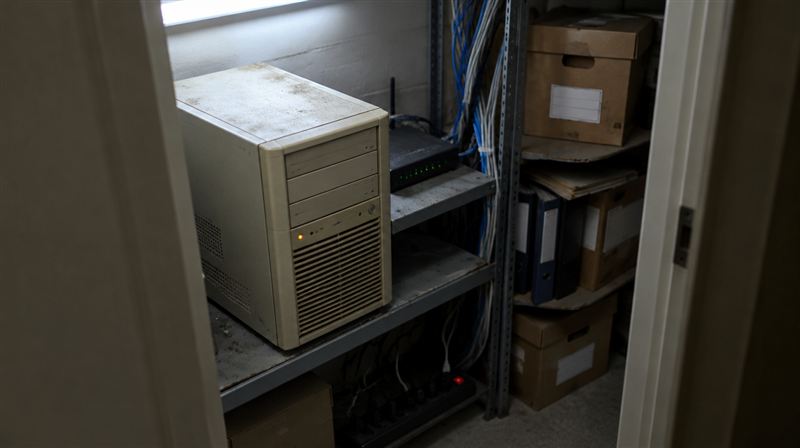
The box that holds your client files becomes a server sized from what it actually uses. Same folders, same access, same logins — on Monday people open files the way they did on Friday.
Rules written for your firm, on a network isolated from every other client, with an encrypted connection from your office to the new setup.
We back up each covered server daily and test a restore every month. Results go into your monthly record.
| Example · access that moves with your files | Partners | Tax preparers | Bookkeepers | Front desk |
|---|---|---|---|---|
| Tax clientsReturns, workpapers | ||||
| Bookkeeping clientsLedgers, statements | ||||
| Payroll clientsEmployee records | ||||
| Client intakeScans, drop-offs | ||||
| Firm finances & HRPartners only |
You choose your move week before paying. We start building about 3 weeks before it, and never build or touch the old server from January 1 through April 15. Your switch-over night follows the rehearsal; an early move week may need a later night. Choose around your other busy periods too.
This is a planning example, not a filing calendar. January 1 through April 15 is blocked for building and changes to the old server. Other busy periods are yours to consider when choosing your move week.
Your team works as usual. The new setup is already built and tested; nothing is being improvised.
VNYX copies the last changes and moves your office over. You can follow every step on a live status page.
Same files and logins, programs as your plan describes. The checks are done and monitoring is on.
Your plan says which servers we recreate or copy, and what stays with your existing provider. Programs come along only on servers your plan copies disk by disk. File and sign-in servers are recreated; their programs do not come along. Your plan says what happens to each server and flags license or hosting restrictions.
Tiers go by size: the higher of people or servers sets yours. A firm with one server in the closet usually lands in Core or Office — your plan will say which, and why.
$1,900One-time setup
A small office with one server in the closet.
$3,900One-time setup
A growing office with a few servers that each do a job.
$5,900One-time setup
An established firm with years of files across several servers.
Infrastructure at exact cost + $45 per person · minimum $450
Servers, firewall rules, connection and backup are billed at exact cost, itemized. Your first month is included in setup. Your monthly cap holds for 12 months from the switch-over night. Daily backups, a restore tested every month, checks, updates, sign-in notices and a monthly record are included.
Something not covered here? Email contact@vnyxit.com — you get an answer in writing, and nobody will try to book you on a call. Support is Mon–Fri, 8 AM–8 PM ET; outside those hours we respond to outages, and anything else is answered the next business day.
No — and be wary of anyone who says their product does. Compliance depends on your whole information security program, which your firm owns. VNYX runs your servers, firewall and online backup, watches them around the clock and gives you a monthly report of what was checked. It doesn’t set up sign-in methods such as multi-factor authentication, and it doesn’t write your program.
This isn’t legal advice; your own advisor can tell you what the rule requires of your firm specifically.
No. The written plan is yours to own — IRS Publication 5708 walks tax professionals through creating one. What VNYX gives you is a plain-English description of your infrastructure and a monthly report of what was checked, which you can reference in your plan.
Programs come along only on servers your plan copies disk by disk. File and sign-in servers are recreated; their programs do not come along. Your plan says what happens to each server and flags license or hosting restrictions. For a fresh server, you or your vendor set up the program with our guide.
We do not start building or touch your old server from January 1 through April 15. Pick your move week after that period. We build about 3 weeks before it where the season allows, then rehearse before you choose the night.
Your setup is dedicated to your firm. We run it as administrator, handle repairs within the plan and cap, and ask for approval before changing its scope or price.
Give us 30 days’ notice in writing, on your move page or by email, then confirm through the link we email you. Your office keeps running during the notice. We transfer your servers, data, private network and backups into your firm’s name, or copy them into your account if a direct transfer cannot work. We hand over administrator access, keys, your plan and the history of checks and restores. Shared VNYX services and the connection app do not transfer; we show the cost of your replacement connection before you confirm. No exit fee.
In a private cloud set up for your office, in a US data center. Each month you pay the infrastructure at exactly what it costs — itemized, no markup — plus $45 per person to run it, with a $450 minimum. We earn on running it, not on reselling servers.
Tell us each server’s version. The scan confirms it; your plan flags versions and programs we cannot move yet.
Or read how trust works here first.